Redecor - Home Design Game
- 4.5
- Rating
- 10.00M
- Installs
- Free
- Price

 Analysis by App-foxy
I approached Redecor as a relaxing home-design game rather than a serious interior-planning tool, and that distinction matters. Its appeal comes from making small creative decisions, seeing a room change quickly, and deciding whether the result feels good enough to submit or keep refining. The experience is easy to understand from the first session, but it also creates a steady reason to return through fresh design tasks, unlocks, and the satisfaction of improving your visual judgment.
Developed by Reworks Ltd., this free simulation game is aimed at anyone who enjoys decorating spaces without needing construction knowledge or a large time commitment. I found it especially comfortable on a phone because a typical design can be approached in short bursts: choose a finish, compare alternatives, adjust the mood, and move on. It is listed for Everyone, so the tone is broadly accessible, although the presence of optional purchases means parents may still want to pay attention to how a younger player uses the game.
How the first design goals create momentum
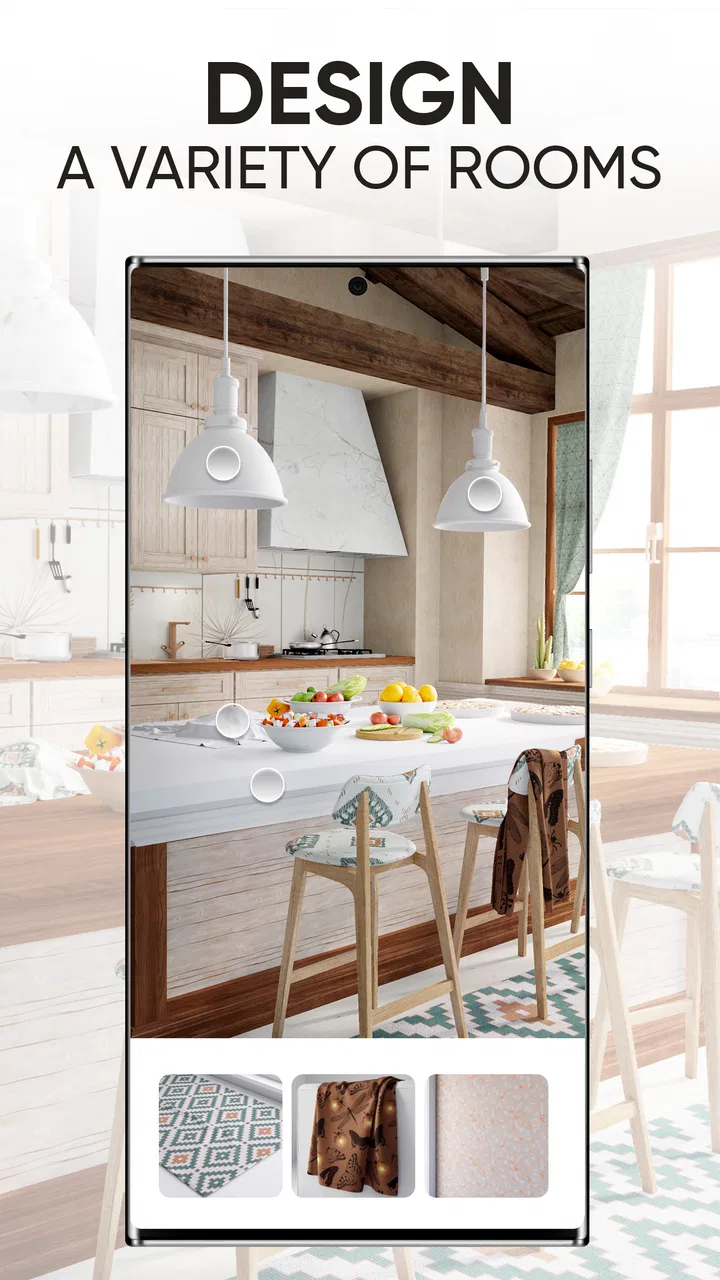
The early goals are simple in the best way. You are not asked to learn a complicated building system before doing anything enjoyable. Instead, the game places the focus on visual choices: colors, materials, furniture styles, and the overall feeling of a room. That immediate feedback makes the opening sessions approachable even if you have never played a design game before.
You May Also Like

 Blood Strike: 2.5 Anniversary
Blood Strike’s Loadouts Turn Every Drop Into a Tactical Gamble
A close look at Blood Strike’s custom loadouts: how fast access to signature weapons reshapes its battle royale rhythm, rewards preparation, and narrows the gap between fights.

 Pandora - Music & Podcasts
Pandora’s Music Is Easy to Start, but Harder to Recover
Pandora’s strength is its low-effort path from a seed to a station. Its weak spot is how much confidence it asks you to place in connection, setup, and quiet recovery.

 8 Ball Pool
 Is Built on Rivalries, Rematches, and Routine
A close look at the rivalries, rematches, shared routines, and unanswered safety questions that turn a quick pool match into a persistent mobile community.

 Samsung Music
’s Quiet Strength Is Playing What You Already Own
Its reach comes less from spectacle than from dependable access to a personal library. That simplicity is both the app’s strongest retention engine and its ceiling.

 AccuWeather: Weather Radar
AccuWeather Review: A Quick, Clear Forecast for Everyday Decisions
For everyday plans, the best forecast is the one you can understand quickly. AccuWeather makes rain timing, radar, and local conditions easy to act on, with a few trade-offs.

 Hill Climb Racing
Why Hill Climb Racing Still Turns Crashes Into One More Run
A tiny car, a bumpy hill and one more upgrade: Hill Climb Racing keeps resurfacing because its simple chaos makes every near-miss feel personal.
More From Our News Desk



I like that the first objective is not perfection. It is learning how the available choices interact. A pale wall can make a room feel larger, while a strong accent can give it character but also make the rest of the design harder to balance. Those decisions turn what could have been a basic decorating exercise into a gentle lesson in contrast, proportion, and consistency.
The most useful way to play at the beginning is to choose a direction before selecting individual items. I usually decide whether I want a warm, minimal, dramatic, or playful result, then avoid options that pull the room in unrelated directions. This prevents the common beginner mistake of choosing every attractive object separately and ending up with a space that has no clear identity.
That approach also makes the game feel more personal. Two players can work from the same room and produce very different results because the challenge is not only about finding a beautiful item. It is about building a visual relationship between several decisions. For me, that is where the simulation label becomes meaningful: the game imitates the thinking process of decorating, even though it remains much more accessible than professional design software.
There is a practical everyday use case here. If I have a few spare minutes while waiting for an appointment, I can complete part of a room without committing to a long session. Later, I can return with a clearer idea of what feels wrong. That pause is surprisingly helpful because I often notice that a design needs less decoration, not more, after looking at it again.
What progress feels like in practice
Progress in this game is communicated through the steady arrival of new design decisions and the sense that each completed task contributes to a larger run of activity. The important signal is not simply finishing a room; it is becoming more deliberate. At first I tended to choose items based on individual appeal. After several designs, I started thinking about the room as a whole and making choices that supported one another.
Unlocks give that improvement a concrete shape. They encourage me to revisit the game because there is usually another visual possibility to work toward, but they do not replace the creative part of the experience. The reward is most satisfying when a newly available option solves a problem I had already encountered, such as needing a calmer texture or a stronger focal point.
One tip that made a noticeable difference was saving my boldest choices for the element I wanted people to notice first. If every surface competes for attention, the room becomes noisy. A distinctive chair, wall treatment, or decorative detail works better when the surrounding choices are restrained. This is not a rule the game forces on me, but it is the kind of lesson I naturally picked up by comparing finished rooms.
Another useful habit is to inspect the whole composition before making the final decision. A close view can make a single object look excellent while hiding the fact that it clashes with the rest of the space. I now judge the design at a glance first, then look for details. That order helps me avoid spending too much time polishing a room whose basic color balance is already off.
The game also suits players who enjoy sharing opinions about style, even when they are playing alone. I often find myself imagining which design a friend would prefer and why. It turns the activity from simple decoration into a small argument about taste, restraint, comfort, and personality.
Challenge and the shape of the difficulty curve
The difficulty does not come from complicated controls. It comes from the growing pressure to make choices that work together. Early tasks can feel forgiving because almost any coherent arrangement looks presentable. As I became more familiar with the available styles, I also became more critical of my own work. A room that once seemed finished could suddenly look flat, overmatched, or too safe.
That is a healthy kind of challenge for a casual simulation. The game does not require quick reflexes, precise timing, or memorizing rules. Instead, it asks me to solve a visual problem with limited attention and a particular brief. The challenge rises because my standards rise, not because the controls become hostile.
Still, the difficulty can feel subjective. A player who already understands interior styling may find the basic decisions comfortable, while someone who prefers clear right-or-wrong answers may feel uncertain. There is no universal solution to a room that depends on taste. I enjoy that openness, but I can see why another player might want more direct guidance.
When I get stuck, I use a three-step reset. First, I remove the item that attracts my attention for the wrong reason. Second, I reduce the number of competing colors. Third, I choose one material or shape to repeat. Repetition creates a visual link between separate parts of the room, and it is often more effective than adding another decorative object.
This is also where the game differs from many traditional puzzle titles. A puzzle usually tells me when I have solved the problem. Here, the result remains open to interpretation, so the satisfaction is tied to making a convincing design rather than clearing a fixed obstacle. Players who want measurable mastery may prefer a more rule-driven game. Players who enjoy experimenting with taste will probably find the uncertainty engaging.
Where the pacing works, and where it can feel demanding
The pacing is built around short creative cycles. I can enter, make several choices, and leave with a completed visual result rather than waiting through a long story or learning a large system. That makes it easy to fit into a daily routine. I have used it as a wind-down activity because it gives my attention something gentle to organize without demanding the intensity of an action game.
At the same time, the steady flow of goals and unlocks can create retention pressure. Once I have started a sequence of designs, I naturally want to continue and see what becomes available next. That feeling is not necessarily negative; a good progression loop should make the next session feel inviting. The important question is whether I am returning because I want to design or because I feel pushed to keep up.
For me, the answer changes depending on how I approach the game. If I treat every room as a test that must produce an ideal result, the experience becomes tiring. If I treat each one as a visual experiment, the pacing feels much more comfortable. I recommend setting a personal stopping point rather than playing until every immediate goal is complete.
The free entry point is a clear advantage, but optional purchases can affect how some players experience the rhythm of progression. In-app items range from $0.49 to $149.99 each, which is a very wide spread. I would not recommend spending simply to remove the feeling of waiting or to chase every available option. The better approach is to decide beforehand whether the creative activity itself is enough value without purchases.
This matters particularly for families. The Everyone rating makes the game broadly suitable in tone, but a child may not evaluate optional spending the same way an adult does. I would play together at first, explain that the game can be enjoyed without automatically buying every tempting item, and keep purchase controls managed through the device.
How it compares with other ways to decorate
Compared with a full interior-design application, this game is much faster and less demanding. It does not ask me to measure a real room, plan a renovation, calculate a budget, or check whether furniture would physically fit through a doorway. That makes it a poor substitute for practical home planning, but an excellent choice for exploring visual ideas without consequences.
Compared with a traditional life simulator, it is more focused. I am not managing a character’s schedule or maintaining a larger virtual household. The room itself is the main subject, so the experience feels cleaner and easier to enter for someone who mainly wants decoration. A life simulator is better if I want stories, relationships, and broader management; this is better when the design decision is the activity I came to enjoy.
It also differs from freeform creative tools because the task structure gives me a reason to make a decision. A blank canvas can be liberating, but it can also be intimidating. Here, the room and its design context provide a starting point. I still have room to express my taste, yet I am not staring at an empty screen wondering what to create.
The trade-off is that structured challenges can eventually feel narrower than unrestricted building. If you want to design an entire house from an empty plot, test realistic layouts, or control every architectural detail, another option will suit you better. This game is strongest as a curated decorating experience, not as a professional planning package or a complete construction sandbox.
Who will enjoy it, and who should skip it
I would recommend it to players who like color matching, visual comparisons, mood boards, and small creative decisions. It is also a good fit for people who want a calm mobile game that can be played in brief sessions. You do not need to know design terminology to enjoy it, and the learning curve comes from observation rather than technical skill.
It is less suitable for anyone who dislikes subjective scoring or open-ended results. If you need constant action, a strong narrative, or a clear win condition, the decorating loop may feel too quiet. Players who are sensitive to monetization pressure should also approach carefully, particularly because the optional purchase range reaches from small amounts to much larger individual items.
I would also skip it as a serious renovation planner. It can help me think about combinations and style, but a virtual room is not evidence that a real product will fit, feel comfortable, or work with existing lighting. I treat the game as inspiration and entertainment, never as a replacement for measurements or practical decisions.
Technical details worth knowing before installing
The game is free to install and supports devices running Android 7.0 or later. Its current version is 3.59.3, and the project has been available since April 10, 2020. Those details suggest a mature title rather than a brand-new experiment, which matches my impression of a game built around an established decorating loop.
Its audience is substantial, with over 10 million installs. The average rating is 4.5 from around 315 thousand ratings, alongside roughly 43 thousand written reviews. I would not treat those figures as a guarantee that every player will enjoy the pacing, but they do indicate that the central idea has connected with a large mobile audience.
Because it is a simulation game, I would check the device experience before committing to long sessions. Design-heavy screens are most comfortable when the display is large enough to compare several parts of a room. On a smaller phone, I prefer making broad choices first and leaving fine adjustments for later, when I can view the result without rushing.
My progression verdict
The progression works because it connects three satisfying feelings: completing a room, discovering another design possibility, and becoming more confident about why one arrangement works better than another. The goals are easy to understand, the unlocks give the next session a purpose, and the challenge grows mainly through taste and judgment rather than punishing mechanics.
Its main weakness is that the same loop can become repetitive if I stop caring about the design decisions and start treating completion as a chore. The optional purchase structure adds another point of caution, especially for players who feel compelled to collect every possibility. I get the most from it when I slow down, make a clear stylistic choice, and accept that not every room needs to be perfect.
After spending time with it, I see Redecor as a polished casual decorating game for people who want creative control inside manageable boundaries. It is not the deepest home-planning tool, nor is it the right choice for action-focused players. But if you enjoy turning a plain room into something with personality, comparing different visual approaches, and returning for another small design challenge, I think it is worth trying. My strongest recommendation is to play for the design process first and treat the unlocks as a bonus, because that keeps the pacing enjoyable instead of letting the progression dictate your entire session.
FAQs for Redecor - Home Design Game
01What is Redecor and how does it work?
Redecor is a home design simulation game available on Android and iOS, where users can unleash their creativity by designing and decorating virtual spaces. Players participate in daily design challenges, using realistic 3D graphics to create stunning interior designs. The game allows you to experiment with colors, textures, and furniture arrangements, providing a platform to explore your design style.
02Is Redecor free to play?
Yes, Redecor is free to download and play. However, it offers in-app purchases that allow players to buy premium items, materials, or currency to enhance their design experience. While these purchases can offer advantages, players can still enjoy the core gameplay for free by completing challenges and earning rewards.
03Do I need an internet connection to play Redecor?
Yes, an internet connection is required to play Redecor. The game features online competitions and challenges that rely on an internet connection to function. Additionally, downloading new design content and updates requires being connected to the internet to ensure you have access to the latest features and materials.
04Can I play Redecor on multiple devices?
Yes, you can play Redecor on multiple devices by connecting the game to your Facebook account or through email registration. This allows your progress to be saved and synced across different devices, ensuring you can continue your design journey seamlessly, whether you're on your phone or tablet.
05How does the voting system work in Redecor?
In Redecor, the voting system is a key feature where players can evaluate each other’s designs. After submitting a design for a challenge, it is pitted against other players' designs, and users vote on their favorites. This system encourages creativity and offers feedback, with higher-rated designs earning more rewards.
Pros
- Intuitive user interface for easy navigation.
- Wide variety of design options available.
- Regular updates with new challenges.
- Engaging community for inspiration and feedback.
- Realistic graphics enhance the design experience.
Cons
- In-app purchases can be expensive.
- Limited free resources restrict creativity.
- Requires internet connection to play.
- Some designs take time to unlock.
- Ads can interrupt the gameplay flow.

Redecor - Home Design Game
Gallery